Best Meeting Reminder App for macOS: Meetly vs Meety vs MeetingBar vs In Your Face
On this page
If you spend your day in code, design, writing, or research, a small calendar banner is easy to miss. That is why many Mac users are looking for the best meeting reminder app for macOS or the best meeting reminder app for Mac: not another full calendar replacement, but a focused tool that shows what is next and interrupts you when a meeting actually matters.
This guide compares four practical options for Mac: Meetly, Meety, MeetingBar, and In Your Face. It also covers the most common searches behind this decision, including a fullscreen meeting reminder for Mac, a MeetingBar alternative, a Meety alternative, and a way to join Zoom, Google Meet, or Microsoft Teams without digging through Calendar.
The most useful options today solve slightly different problems. MeetingBar is a lightweight menu bar meeting launcher. Meety focuses on Google Calendar, live countdowns, and configurable alert levels. In Your Face specializes in full-screen event alerts and one-click video-call joining. Meetly combines a native menu bar workflow with fullscreen reminders, one-click joining, multiple calendar sources, and a Quick Panel on Pro.
Here is the short answer: if you only need to glance at your next meeting, MeetingBar may be enough. If your entire schedule lives in Google Calendar and you want adjustable alert intensity, Meety is worth a look. If you want a dedicated full-screen alert with broad video-service detection, In Your Face is a strong option. If you want a meeting reminder that is genuinely difficult to miss across multiple calendars and displays, plus a full planning workflow, Meetly is the strongest all-round choice.
What should the best meeting reminder app for Mac do?
A good macOS meeting reminder should do more than repeat the notification already provided by Calendar. The important features are:
- A visible menu bar schedule without opening a large calendar window
- A countdown before the call starts
- One-click joining for Zoom, Google Meet, Microsoft Teams, and common meeting links
- A reminder that can reach you while another app is fullscreen or covering the desktop
- Snooze and dismiss controls, so the alert remains useful rather than annoying
- Support for the calendars you already use
- Clear privacy and pricing policies
The key distinction is between finding a meeting and not missing a meeting. A menu bar list solves the first problem. A prominent, well-timed alert solves the second.
Is Meetly the best meeting reminder app for Mac?
For users who want one app for meetings and reminders, Meetly is a strong candidate. The free plan combines a menu bar calendar, fullscreen meeting alerts, and one-click join for one calendar. Pro adds Quick Panel planning, free-time sharing, post-meeting action items, unlimited calendars, Apple Reminders due-date alerts, quiet hours, screen-share privacy, and iCloud sync across Macs.
That makes Meetly more than a simple MeetingBar alternative or fullscreen alarm. It is a focused macOS meeting and task reminder that works with the calendar accounts already shown in Apple Calendar.
Meetly: best for people who miss meetings during deep work
Meetly is a native macOS menu bar app built around the moment before a meeting starts. It reads the calendars already visible in macOS Calendar, then shows the next event in the menu bar and opens a fullscreen reminder when it is time to pay attention.
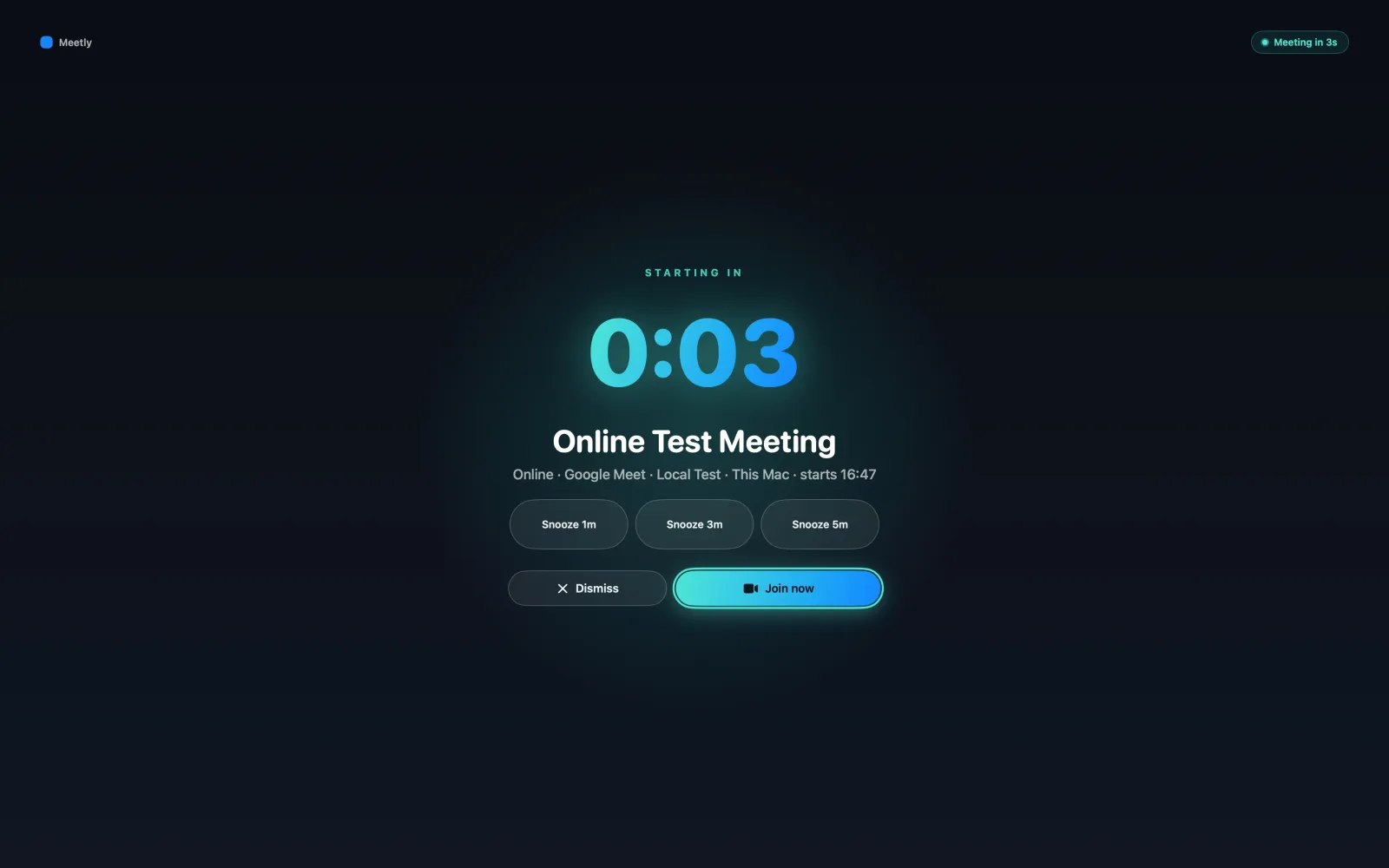
The reminder includes the event title, start time, live countdown, and actions to Join, Snooze, or Dismiss. It can appear across your displays, which matters if you are working on one monitor while the calendar notification lands on another.
Meetly’s biggest advantage is that the fullscreen alert is the center of the product, not an optional notification setting. It is designed for the common failure mode of seeing a small banner, dismissing it automatically, and continuing to work until the call has already started. The same workflow can also surface due-date tasks from Apple Reminders, so important follow-ups do not disappear just because they are not calendar events.
Why Meetly stands out
- Fullscreen reminders across displays
- Quick Panel with pinned events and live countdowns on Pro
- One-click joining for Zoom, Google Meet, Microsoft Teams, and other supported links
- Calendars from Google, Outlook, iCloud, Exchange, and other providers shown in macOS Calendar
- Free-time sharing and post-meeting action items on Pro; meeting muting on either plan
- Apple Reminders with due dates on Pro
- Quiet hours and screen-share privacy controls on Pro
- Optional iCloud sync across Macs on Pro
- Local-first calendar privacy with no Meetly backend for event content
- Free core plan and a $6.99 (was $9.99) one-time Pro Lifetime purchase until 30 Sep 2026, rather than a subscription
Meetly is the best fit if your real problem is attention. You do not need a bigger calendar; you need a reliable signal that can break through a focused work session at the right time.
Meety: best for Google Calendar users who want alert levels
Meety is a focused macOS menu bar calendar app aimed primarily at Google Calendar users. It shows upcoming meetings with a live countdown, surfaces Meet, Zoom, and Teams links, and offers Day, Week, Month, and Agenda views.
Its most interesting feature is configurable reminder intensity. Meety lets you use softer alerts for ordinary events and stronger alerts — including a Hard Alert — for meetings you cannot miss. Alert behavior can also be controlled per calendar, which is useful when work and personal schedules should not interrupt you in the same way.
Meety is a good choice when Google Calendar is the center of your workflow and you want more control than the default macOS notification. Its narrower calendar focus can also make the setup feel direct for users who do not need to combine several calendar providers.
Where Meetly has an edge over Meety
Meetly is designed to work with the calendar accounts that appear in macOS Calendar, rather than assuming one calendar ecosystem. That makes it a better fit for people combining Google, Outlook, iCloud, Exchange, work, client, and personal calendars.
Meetly also puts more emphasis on the complete pre-meeting workflow: a reminder across displays, plus Quick Panel planning, free-time sharing, post-meeting action items, Apple Reminders, screen-share privacy, and optional cross-Mac state sync on Pro. In other words, Meety is especially compelling for Google Calendar alert control; Meetly is broader for a mixed-calendar Mac workflow.
In Your Face: best for unapologetic full-screen alerts
In Your Face takes the direct approach: when an event is close, it puts a full-screen alert in front of you. It uses Apple Calendar, can detect video-conference links from many services, and supports one-click joining. It also includes event overviews, custom alert behavior, filters, sounds, themes, and Apple Reminders support.
In Your Face is a strong fit if you want the reminder itself to be the product. It has a long track record around the simple promise of putting events “in your face” before they start, and it also extends beyond meetings to custom reminders and other Apple devices.
Where Meetly has an edge over In Your Face
Meetly and In Your Face overlap most on fullscreen alerts, so the choice depends on workflow. Meetly is more focused on a unified meetings-and-tasks workflow: the alert is connected to its menu bar schedule, live countdown, quick join, and meeting muting, plus pinned Quick Panel, free-time sharing, Apple Reminders due dates, and post-meeting action items on Pro.
Meetly is also positioned as a local-first Mac utility with optional Pro iCloud sync of reminder state across Macs. For users who want a lightweight Mac workflow with a free core plan and one-time Pro upgrade, that can be simpler than choosing a cross-device subscription. In Your Face is the better fit when iPhone, iPad, Apple Watch, custom reminders, and visual customization are priorities.
MeetingBar: best for a free, open-source meeting launcher
MeetingBar is a well-known open-source menu bar app for macOS. It keeps upcoming calendar events close at hand, extracts meeting links, and lets you join calls quickly. Its official project supports a broad range of meeting services, including Zoom, Google Meet, Microsoft Teams, Webex, Discord, and many others.
MeetingBar’s strength is simplicity and breadth. If your desired workflow is “check the menu bar, click the next meeting, join the call,” it remains a sensible option. It is free and open source, and it stays quiet until you ask it for information.
Where Meetly has an edge over MeetingBar
MeetingBar is primarily a meeting launcher and agenda utility. Meetly adds a stronger attention layer: fullscreen reminders, live countdowns, and join/snooze/dismiss actions, plus a pinnable Quick Panel and controls for quiet hours and screen sharing on Pro.
That difference matters when the problem is not locating the meeting link. It is noticing that the meeting is about to begin while you are already focused on something else.
Meetly vs Meety vs MeetingBar vs In Your Face
| Feature | Meetly | Meety | MeetingBar | In Your Face |
|---|---|---|---|---|
| macOS menu bar app | Yes | Yes | Yes | Yes |
| Fullscreen or hard meeting alerts | Fullscreen across displays | Hard Alert and configurable levels | Standard reminders | Fullscreen alerts |
| Live countdown | Yes | Yes | Yes | |
| One-click meeting join | Yes | Meet, Zoom, Teams | Yes, with broad service support | |
| Google Calendar | Via macOS Calendar | Core focus | Via calendar integrations | |
| Outlook, iCloud, Exchange calendars | Yes, via macOS Calendar | More limited / setup-dependent | macOS calendar support | |
| Quick Panel / agenda view | Pro Quick Panel; Free today + tomorrow | Day, Week, Month, Agenda | Upcoming events menu | |
| Apple Reminders and due-date alerts | Pro | No | No | Yes |
| Quiet hours | Pro | Per-calendar alert controls | Limited | |
| Screen-share privacy | Pro | Available in its workflow | Not a core feature | |
| iCloud sync across Macs | Pro | Cloud sync service | Not a core feature | Cross-device app support |
| Open source | No | No | Yes | No |
| Subscription required | No | Check current plan | No | Check current plan |
Features and pricing can change, so check each product’s current site before buying. The comparison above is about product direction: MeetingBar prioritizes an open-source launcher, Meety prioritizes Google Calendar and alert control, In Your Face prioritizes prominent event alerts across Apple devices, and Meetly prioritizes reliable attention across a broader Mac calendar workflow.
Which Mac meeting reminder should you choose?
Choose MeetingBar if you want a free and open-source menu bar utility, broad meeting-service support, and a quick way to open the next call.
Choose Meety if you are primarily a Google Calendar user and want configurable alert strength, per-calendar rules, and familiar Day, Week, Month, or Agenda views.
Choose In Your Face if you want a dedicated full-screen event reminder, broad video-service detection, custom sounds and themes, and support across Mac, iPhone, iPad, and Apple Watch.
Choose Meetly if you want fullscreen reminders that are hard to miss, one-click joining, and support for a calendar through macOS Calendar, with Pro options for unlimited calendars, Quick Panel, Apple Reminders, privacy controls, and a one-time purchase instead of another recurring subscription.
The best meeting reminder is the one that matches your failure mode
There is no universal winner for every Mac user. MeetingBar is excellent at keeping meetings nearby. Meety is thoughtful about Google Calendar and alert escalation. In Your Face is compelling when maximum visual interruption is the priority. Meetly is strongest when you regularly miss meetings because a small notification disappears behind your work and you want the reminder connected to a broader meeting workflow.
That is the reason Meetly feels different from a normal calendar notification. It lets you stay focused until the meeting matters, then gives you a clear interruption with the information and action you need immediately.
Meetly is free to download for macOS 14 or later. The free plan includes the core meeting reminder workflow for one calendar, while Pro adds Quick Panel, free-time sharing, post-meeting action items, unlimited calendars, Apple Reminders, quiet hours, screen-share privacy, and iCloud sync. Pro Lifetime is $6.99 (was $9.99) one-time until 30 Sep 2026 with a 14-day money-back guarantee.
Try Meetly for macOS if you want a meeting reminder that does more than sit quietly in the corner of your screen.