Free forever · macOS native · v0.1.0

Never miss a
client meeting again.

Meetly is a native macOS menu bar app that fires a fullscreen reminder right before your meetings start. Perfect for freelancers juggling multiple calendars across multiple Macs.

macOS 14+ ~8 MB No credit card No subscription
A M J S
★★★★★
Loved by freelancers who can't afford to miss client calls.
Meetly Meeting in 1 min
Starting in
00:58
Q3 Strategy — Acme Studio
Zoom · starts at 10:00 AM

Works with the calendars & meeting links you already use

Google Calendar Outlook iCloud Zoom Teams Meet
The real cost

One missed meeting
costs more than Meetly.

Calendar apps were built to organize your day — not to grab your attention when it matters. If you work across clients, you know the pain.

Notifications you swipe away

That little banner? Gone while you're in deep work. By the time you notice, the client's been waiting ten minutes.

Calendars scattered everywhere

Google for client A, Outlook for client B, iCloud for yourself. No single place watches them all for what's next.

Dismissed on one Mac, gone everywhere

You handled the reminder on your laptop — then your desktop pings you again five minutes later. Chaos.

One missed client call can cost a whole contract. Meetly exists so that never happens.

Your safety net

Not another calendar.
A reminder that's impossible to miss.

Meetly isn't a calendar replacement. It's a focused companion that watches the calendars you choose and interrupts you — gently but firmly — right before a meeting starts.

  • Fullscreen remindersImpossible-to-ignore overlays that appear before your meetings — with a live countdown.
  • All your calendars, one watchlistPick exactly which calendars Meetly monitors. Client, personal, side-project — your call.
  • Sync across your MacsDismiss or join on one device and every other Mac stays in sync via iCloud. (Pro)
  • Privacy-first by designNo backend server. Your calendar data stays on your Mac or in your iCloud. Nothing is sold or shared.
See it in action

Three ways Meetly has your back

Click through the moments that matter — from the fullscreen alert to the quick join.

An overlay you can't ignore

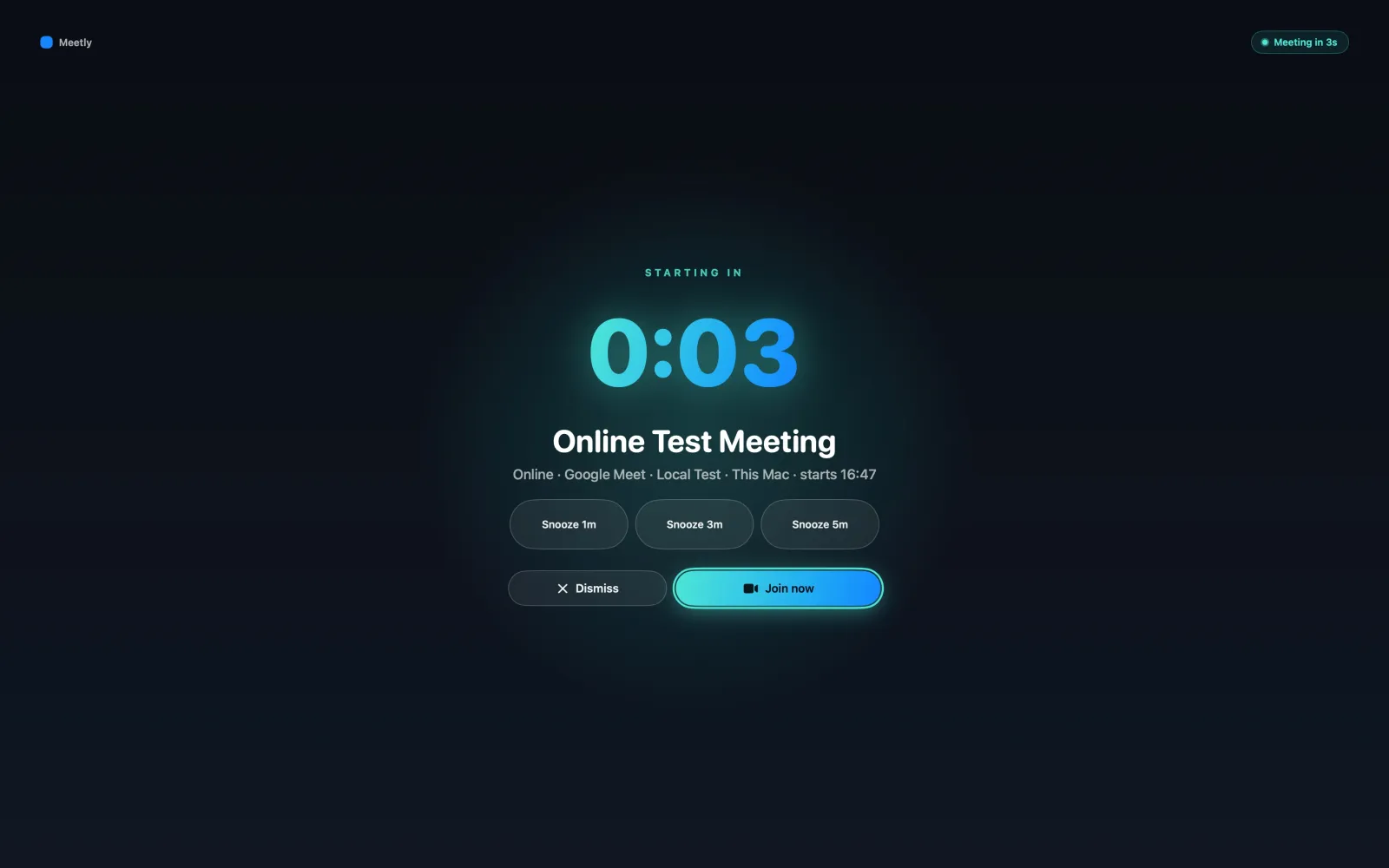
Right before your meeting, Meetly takes over your screen with a clean, calm countdown — the meeting title, the link, and the buttons you need. No more "I didn't see the notification."

  • Live countdown with big, scannable numbers
  • Snooze 1m / 5m or dismiss in one click
  • Detects overlapping meetings and groups them
Meetly Meeting in 1 min
Starting in
00:58
Q3 Strategy — Acme Studio
Zoom · starts at 10:00 AM

Your meetings, one click away

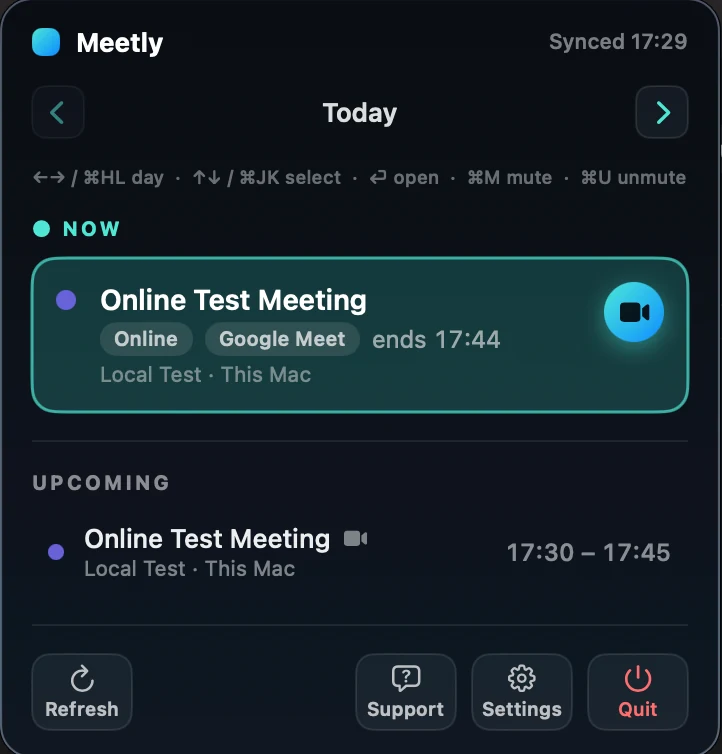
Click the menu bar icon to see what's happening now and what's coming up. The current meeting is always joinable in one click — no digging through calendar apps.

  • "Now" meeting always shown and joinable
  • Upcoming meetings across all watched calendars
  • Icon shows soon / current state at a glance

One click to join anything

Meetly reads your event notes and finds the Zoom, Google Meet, or Teams link for you. No more hunting through invites while the client waits.

  • Auto-extracts Zoom / Meet / Teams links
  • Join straight from the reminder or menu bar
  • Marks the meeting handled everywhere
Join Q3 Strategy?
Built for reliability

Every detail tuned so you don't miss a beat

Small features that save you from the awkward "sorry I'm late" message.

Quick Join

One click to launch Zoom, Meet, or Teams from any reminder.

Quiet hours

No fullscreen blasts at 11 PM. You set the boundaries.

Conflict detection

Overlapping meetings grouped into one clear reminder.

Duplicate merging

Same meeting on three calendars? Meetly shows it once.

Private while screen sharing

Presenting in a meeting? Pro auto-hides your overlay reminder from everyone else on the call — they see your screen as normal, you still see the alert. No more accidental exposure.

Why Meetly

vs. native calendar notifications

Your calendar app organizes your day. Meetly makes sure you actually show up.

Meetly Native calendar apps
Fullscreen reminder before meetings
Watch multiple calendars together (Pro)
Dismiss / join syncs across Macs
One-click join (Zoom / Meet / Teams)
Reminders hidden from screen-share viewers
Privacy-first, no backend server
One-time price, no subscription
Loved by freelancers

People who can't afford to miss calls

★★★★★

"I missed a client kickoff because the calendar notification came in while I was in flow mode. Meetly's fullscreen alert is exactly the safety net I needed. Paid for Pro the day it launched."

A
Alex Rivera
Freelance designer
★★★★★

"I juggle four client calendars across two Macs. Before Meetly, double-notifications were a daily nightmare. Now I dismiss on my laptop and it's handled on the desktop too. Worth every cent."

M
Maya Chen
Contract consultant
★★★★★

"The quick-join alone saves me the awkward 30 seconds of hunting for the Zoom link every meeting. Privacy-first was the clincher — my client data never leaves my Mac."

J
Jordan Park
Indie developer
Simple pricing

Free forever. Pro once.

No subscription, ever. Use the Free plan as long as you want — upgrade only when you need sync across Macs.

Free
$ 0 / forever

Everything you need to never miss a meeting on a single Mac.

  • Fullscreen meeting reminders
  • Menu bar now & upcoming
  • Monitor 1 calendar
  • Snooze, quick join, quiet hours
  • iCloud sync across Macs
Download Free
★ Launch price — save 60%
Pro
$ 3.99 $9.99 / one-time

For freelancers working across multiple Macs. Pay once, own it.

  • Everything in Free
  • Monitor unlimited calendars
  • iCloud sync across all your Macs
  • Cross-device dismiss / join / snooze state
  • Private overlay while screen sharing
  • Priority support
Get Pro — $3.99 once

One-time payment, not a subscription. 14-day money-back, no questions asked. After purchase you'll receive a license key by email — enter it in the app to unlock Pro.

Questions

Before you ask

Does Meetly work with my calendar?
If it shows up in macOS Calendar — Google, Outlook, iCloud, Exchange, and more — Meetly can watch it. The Free plan monitors one calendar, perfect for a single work or personal calendar. Pro unlocks unlimited calendars so you can track work and personal side by side. Meetly reads events to remind you; it never modifies your calendars.
Is my calendar data safe?
Yes. Meetly has no backend server. Your calendar data stays on your Mac, and sync state (dismiss/join/snooze) travels only through your own iCloud when you enable Pro. Nothing is sold, shared, or sent to us.
Do I have to pay every month?
Never. The Free plan is free forever and covers single-Mac use completely. Pro is a one-time $3.99 payment (launch pricing, normally $9.99) that unlocks iCloud sync across your Macs. No subscription, no recurring charge.
What if I work on multiple Macs?
That's exactly what Pro is for. With iCloud sync, dismissing or joining a meeting on one Mac marks it handled on all your Macs — no more double reminders for the same meeting. Pro also keeps your reminders private while you're screen sharing. Single-Mac use stays fully free.
Is Meetly a replacement for my calendar app?
No, and that's intentional. Meetly does one thing exceptionally well: making sure you never miss an important meeting. It works alongside your calendar app, not instead of it. Keep using Google Calendar, Fantastical, or whatever you love.
What macOS version do I need?
Meetly runs on macOS 14 (Sonoma) or later. It's a tiny native app (~8 MB), lives in your menu bar, and uses minimal resources.

Your next client meeting
deserves a safety net.

Install Meetly once. Never send another "sorry I missed this" email.

macOS 14+ Free forever No subscription No credit card