Best Mac Apps for Back to School 2026: Meetly, HoverBoard, LocalMelody
On this page
Back to school on a Mac is less about buying another productivity suite and more about fixing the jobs that break every semester: not missing class or client calls, teaching and demoing without juggling three tools, and making creative work without uploading every idea to the cloud.
If you are searching for the best Mac apps for back to school, the best Mac apps for students and teachers, or a focused back to school Mac software stack, three native apps from codeonholiday cover those jobs cleanly: Meetly, HoverBoard, and LocalMelody.
Short answer: use Meetly so meetings and due-date reminders actually interrupt deep work, HoverBoard when you present or teach on Zoom/Meet/Teams, and LocalMelody when you want private local AI music on Apple Silicon. Through 30 September 2026, every Pro license is 30% off for Back to School.
Back to School sale: 30% off Pro until 30 Sep 2026
All three apps keep a real free core. Pro Lifetime is a one-time unlock — pay once, own it forever, no subscription. For Back to School 2026, Pro Lifetime is discounted across the catalog:
| App | List price | Sale price (30% off) |
|---|---|---|
| Meetly Pro Lifetime | $9.99 | $6.99 |
| HoverBoard Pro Lifetime | $15.99 | $11.19 |
| LocalMelody Pro Lifetime | $9.99 | $6.99 |
The sale ends 30 September 2026. After that, list prices return. Download free first, then upgrade only if the Pro features match how you study, teach, or create.
Meetly: best for schedules you cannot afford to miss
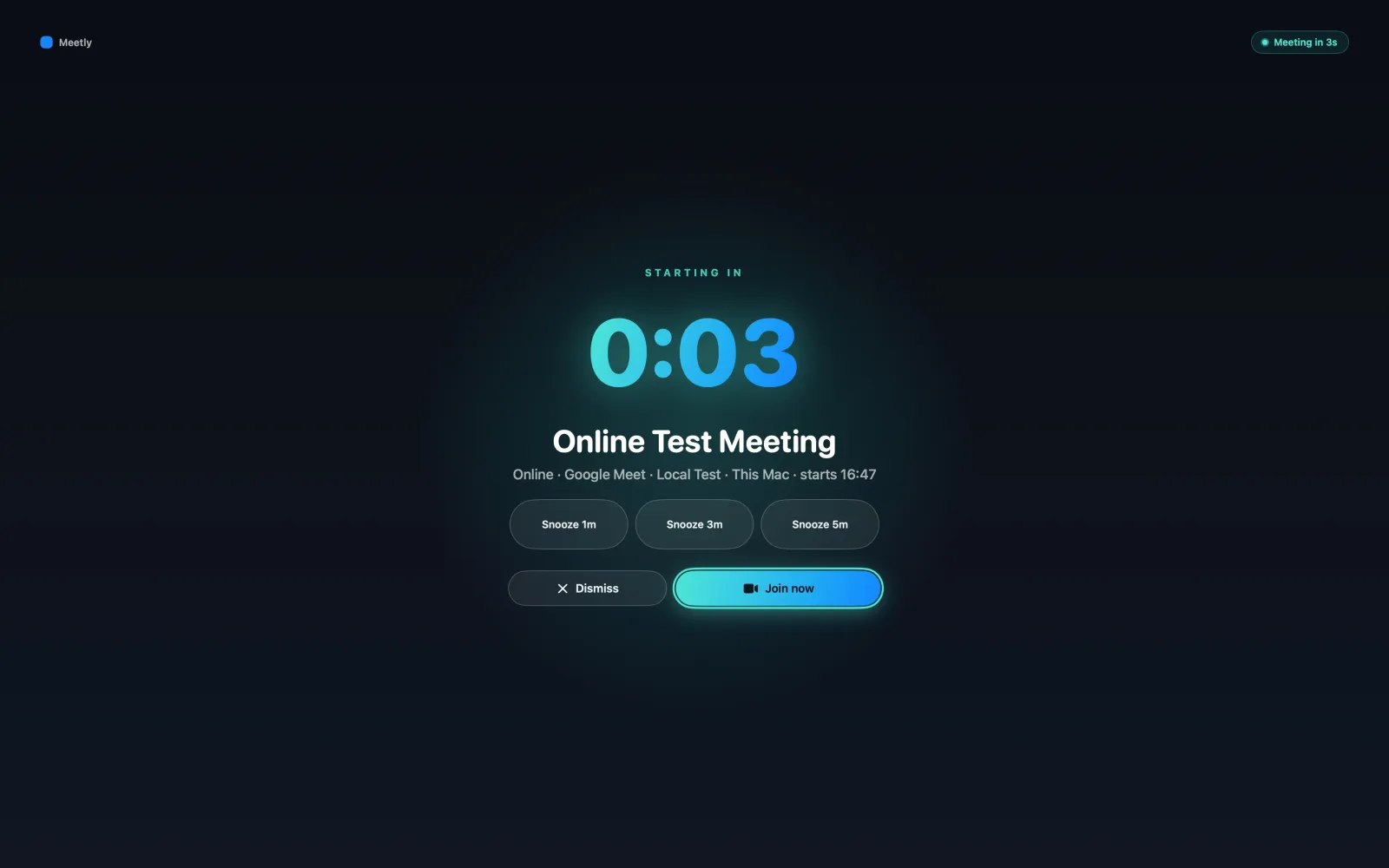
Meetly is a native macOS menu bar app built around the moment before a meeting, class, or standup starts. It reads calendars already visible in macOS Calendar — Google, Outlook, iCloud, Exchange, and more — then fires a fullscreen meeting reminder across your displays with Join, Snooze, and Dismiss.
That matters in a back-to-school rhythm: lecture blocks, office hours, group projects, parent meetings, and client calls all compete with headphones-on deep work. A corner banner is easy to miss. A fullscreen interrupt is hard to ignore.
Meetly also includes one-click join for Zoom, Google Meet, and Microsoft Teams. Pro adds a pinnable Quick Panel, free-time sharing for booking messages, post-meeting action items, Apple Reminders with due dates, unlimited calendars, quiet hours, screen-share privacy, and iCloud sync across Macs.
Who should pick Meetly this semester
- Students juggling classes, clubs, and part-time work calendars
- Teachers and TAs with office hours and faculty meetings
- Freelancers or researchers who keep missing standups during focus time
Free covers the core reminder workflow on one calendar. During the sale, Meetly Pro Lifetime is $6.99 once. For a deeper comparison with MeetingBar, Meety, and In Your Face, read Best Meeting Reminder App for macOS or the How to Use Meetly complete guide.
HoverBoard: best for teaching, presenting, and live demos
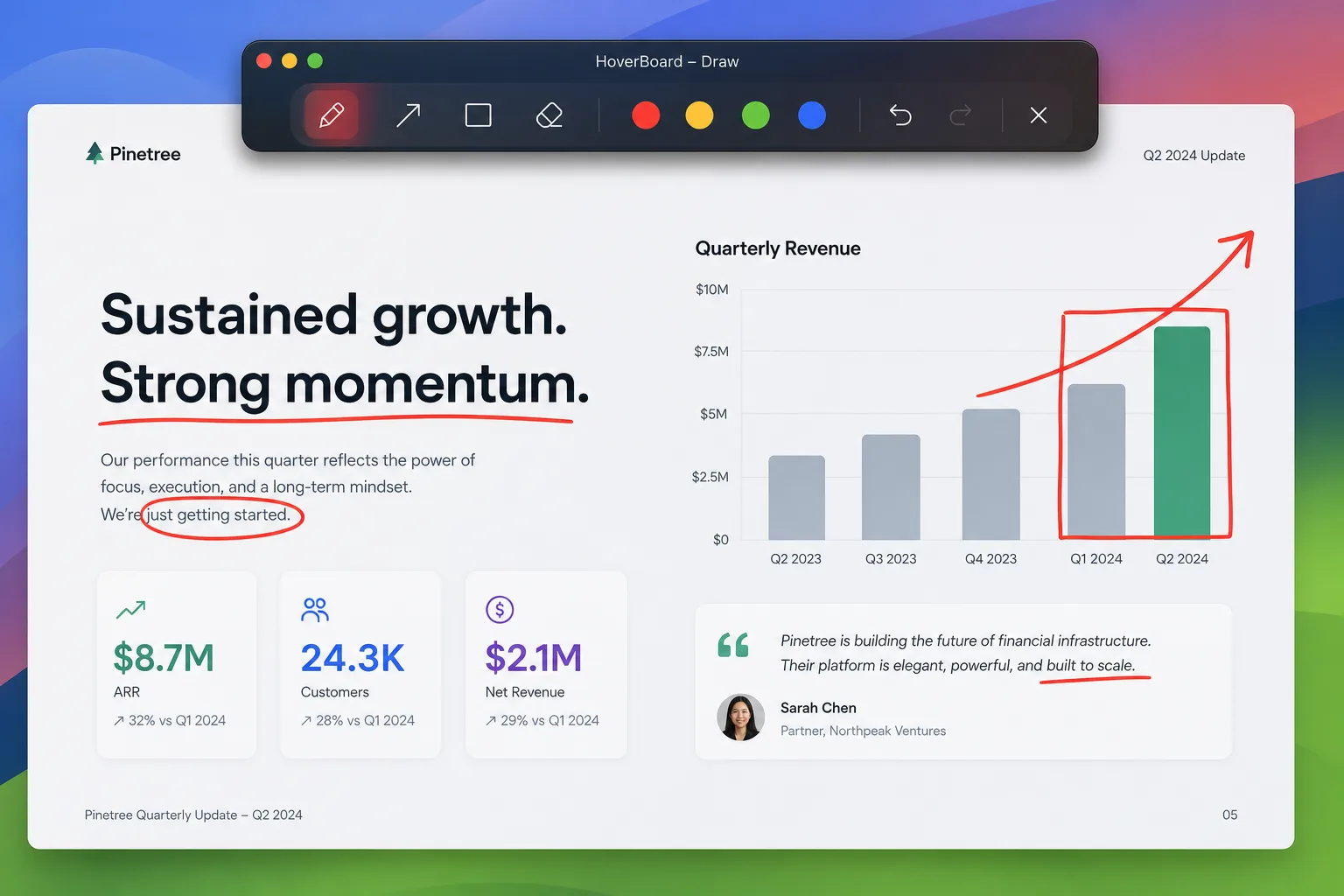
HoverBoard is the Mac tool for the moment you share your screen. Draw and annotate over any app, spotlight the area around your cursor, freeze a changing UI, open a whiteboard, show keystrokes for coding tutorials, and keep private presenter notes beside the session.
For back to school, that maps directly to lectures, lab demos, onboarding sessions, and recorded walkthroughs. Spotlight, Break Timer, Screenshot, and Screen Record stay free forever. Draw and other Pro tools include a 60-second trial so you can test the full workflow before buying.
Why teachers and demo-heavy students like HoverBoard
- Annotate live over Keynote, slides, browsers, or IDEs during screen share
- Spotlight and Cursor Halo so viewers can follow the pointer
- Freeze a messy UI and explain the frame without racing the live page
- Whiteboard and Sessions for diagrams and reusable teaching frames
- Free Screenshot and Screen Record built into the same menu bar app
During Back to School, HoverBoard Pro Lifetime is $11.19 (was $15.99). See Best Annotation Tool for macOS, Best Screen Annotation for Zoom on Mac, or the How to Use HoverBoard complete guide.
LocalMelody: best for private local AI music on Apple Silicon
LocalMelody turns a prompt into music, lyrics, and vocals on your Mac. After the first-time runtime and model download, generation stays local — prompts and audio are not sent to a codeonholiday music backend.
That fits creative and music students who want to sketch ideas for class projects, portfolio pieces, or practice without shipping every draft to a cloud studio. Free lets you try short generations. Pro Lifetime unlocks longer songs, genre/mood/voice/BPM/key controls, voice reference, lyrics refinement, and export.
Requirements in plain terms
- Apple Silicon Mac
- macOS 14+
- 16 GB RAM minimum; 32 GB+ recommended for smoother higher-quality models
During the sale, LocalMelody Pro Lifetime is $6.99 (was $9.99). Compare cloud alternatives in LocalMelody vs Suno and Best Local AI Music Generator for Mac, or follow the How to Use LocalMelody complete guide.
Which Mac app do you need for back to school?
| If your problem is… | Start with | Why |
|---|---|---|
| Missing classes, standups, or office hours | Meetly | Fullscreen reminders + one-click join + Pro Quick Panel |
| Teaching, presenting, or demoing on screen share | HoverBoard | Annotate, spotlight, freeze, screenshot, and record in one app |
| Making music without uploading every idea | LocalMelody | Local AI music on Apple Silicon after setup |
You do not need all three. Pick the job that is currently costing you grades, clients, or creative time. For a shorter chooser, use the Which Mac app do I need? guide or the full Mac App Finder.
Pricing: free cores, Pro Lifetime, limited-time discount
codeonholiday apps are designed so free is useful forever:
- Meetly Free — fullscreen reminders, one-click join, and a today-and-tomorrow agenda for one calendar
- HoverBoard Free — Spotlight, Break Timer, Screenshot, Screen Record forever; 60s Pro tool trials
- LocalMelody Free — 15-second local generations to try the studio
Pro Lifetime unlocks the deeper workflow (Meetly Quick Panel, free-time sharing, action items, extra calendars, and Reminders; unlimited presentation tools; longer music exports) with a one-time purchase on every app — pay once, keep the license. The Back to School discount brings those unlocks to $6.99 / $11.19 / $6.99 until 30 September 2026. After the sale, prices return to $9.99, $15.99, and $9.99.
FAQ
When does the Back to School sale end?
30 September 2026. Checkout and product pages show the sale price while the campaign is active. After that date, Pro returns to list price.
Is Pro a subscription?
No. Meetly, HoverBoard, and LocalMelody each offer Pro Lifetime as a one-time purchase. Pay once, own it forever — no monthly fee for the license described at checkout.
What macOS version do I need?
All three apps require macOS 14 (Sonoma) or later. LocalMelody additionally requires Apple Silicon.
Can I try before I buy?
Yes. Download each app free from its product page. Meetly and HoverBoard expose substantial free workflows; HoverBoard Pro tools also include a 60-second preview. LocalMelody Free covers short generations before a Pro unlock.
Start free, upgrade during the sale
Reset your Mac toolkit for the school year without another bloated suite:
- Download Meetly if meetings and due dates keep slipping
- Download HoverBoard if you teach or demo on screen share
- Download LocalMelody if you want private local AI music on Apple Silicon
Browse every product on the Mac App Finder, then unlock Pro at the Back to School price before 30 September 2026.