How to Use Meetly with Apple Reminders — Fullscreen Alerts for Due Tasks
On this page
Meetings are not the only thing that disappears behind a coding session. Meetly Pro can watch Apple Reminders lists with due dates and fire the same fullscreen overlay you already use for calendar events.
This is a Pro feature. Free still covers one calendar, the overlay, and the today-and-tomorrow menu bar agenda. Quick Panel also requires Pro. Upgrade from the Meetly pricing section when you are ready.
What Reminders integration does
- Select which Reminders lists Meetly monitors
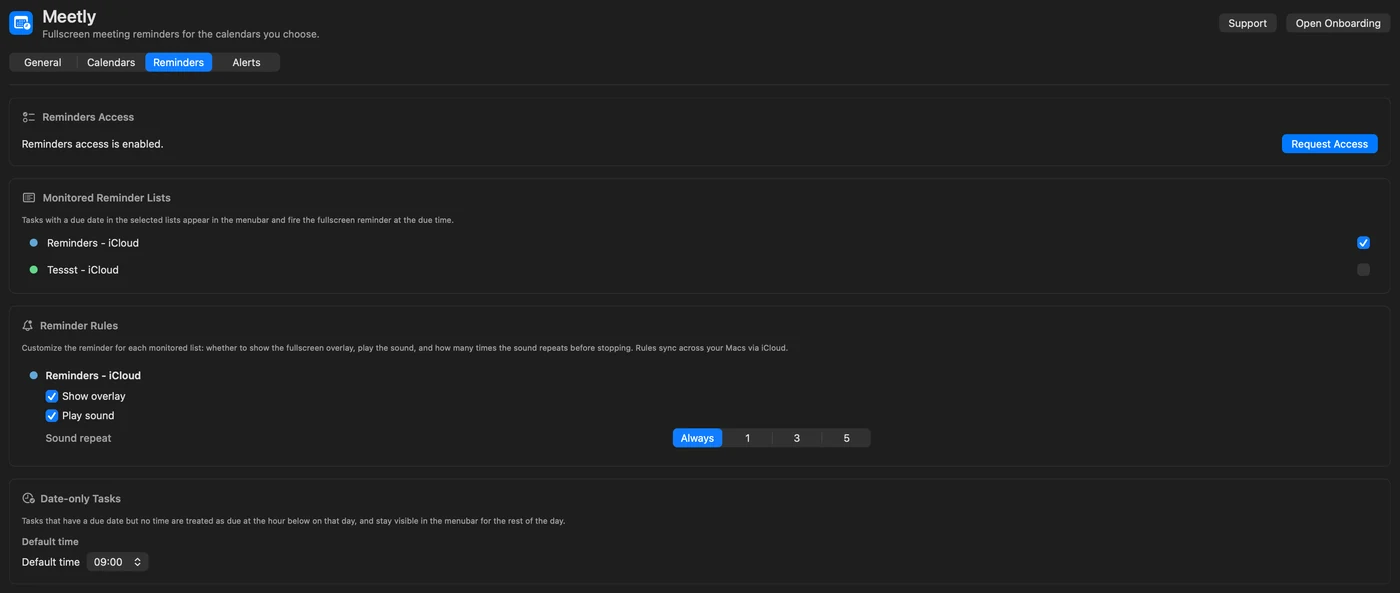
- Tasks with a due time fire like meetings
- Tasks with a date but no time default to 9:00 AM (configurable)
- Per-list overlay and sound rules
- State sync (dismiss / snooze / mute patterns) via your iCloud on Pro
Meetly does not replace the Reminders app. It interrupts you when a due item is about to hit — the same “wake up” moment as a calendar invite.
Set up Reminders access
- Open Meetly → Settings → Reminders.
- Grant Reminders permission when macOS asks (or enable Meetly under System Settings → Privacy & Security → Reminders).
- Toggle the lists you want monitored.
- Adjust per-list overlay and sound rules.
- Confirm status in Settings → General → Health Check.
Put high-stakes personal or work tasks on a dedicated list (“Due today”, “Ship blockers”) and leave shopping lists unmonitored.
Due time vs date-only tasks
| Task type | Meetly behavior |
|---|---|
| Due date and time | Overlay fires before that time (using your global remind-before setting) |
| Due date, no time | Treated as the default time (9:00 AM unless you change it) |
| No due date | Ignored for overlays |
Keep times on anything that must interrupt you. Date-only tasks are easy to flood the morning with if every list is monitored.
Same overlay, same join / dismiss habits
When a Reminders due fires, you get the familiar fullscreen UI: countdown, dismiss, snooze. There is usually no Zoom join button — these are tasks, not calls — but the interruption model matches meetings so muscle memory stays intact.
Combine with:
- Mute and calendar rules for calendar noise
- Quiet hours (Pro) under Alerts so overnight personal reminders stay soft
- Hide during screen share (Pro) when you present and still need private alerts
Privacy
- Reminder contents are read on your Mac through Apple’s APIs.
- Meetly has no backend that stores your task titles or notes.
- Pro sync moves reminder state through your iCloud, not a codeonholiday server.
See the Privacy Policy for the full wording.
Troubleshooting
No Reminders tab or lists empty
Confirm you are on Pro, Reminders permission is granted, and the lists actually contain due items.
Too many morning overlays
Unmonitor noisy lists, or give date-only tasks a later default time. Prefer timed dues for anything critical.
Reminder fired on one Mac but not another
Pro iCloud sync covers state; both Macs still need the same lists monitored and Reminders enabled in iCloud account settings.